
Amazon ECS has a new observability feature: Action Logs, released in July 2026. They record every action ECS takes on your behalf during service deployments and Managed Daemon operations, and deliver those records to CloudWatch Logs, Amazon S3 or Amazon Data Firehose. The documentation shows how to enable them in the console and through the API, but there’s no infrastructure-as-code example. This post fills that gap with a CloudFormation template. It also flags a value the documentation currently gets wrong.
What Amazon ECS Action Logs are
Until now, ECS only showed you the start and end states of an operation. A deployment began, and some time later it succeeded or failed. Everything in between (image downloads, load balancer registrations, state transitions, rollback decisions) was not visible anywhere.
Action Logs record those intermediate steps. Once enabled on a cluster, ECS emits a structured JSON
entry for each action it performs during two types of operations: service deployments (state
transitions, rollbacks and lifecycle hook execution) and ECS Managed Daemon lifecycle operations. Each
entry carries a timestamp, a log level (INFO, WARN or ERROR), an event name such as
DAEMON_DEPLOYMENT_IN_PROGRESS, the ARNs involved and a detail payload with the reason. Metadata about
failed tasks is also kept beyond the standard one-hour retention, so you can investigate a failure at
your own pace.
If you push the logs to CloudWatch, the ECS console can show them directly on the service page to help you debug issues.
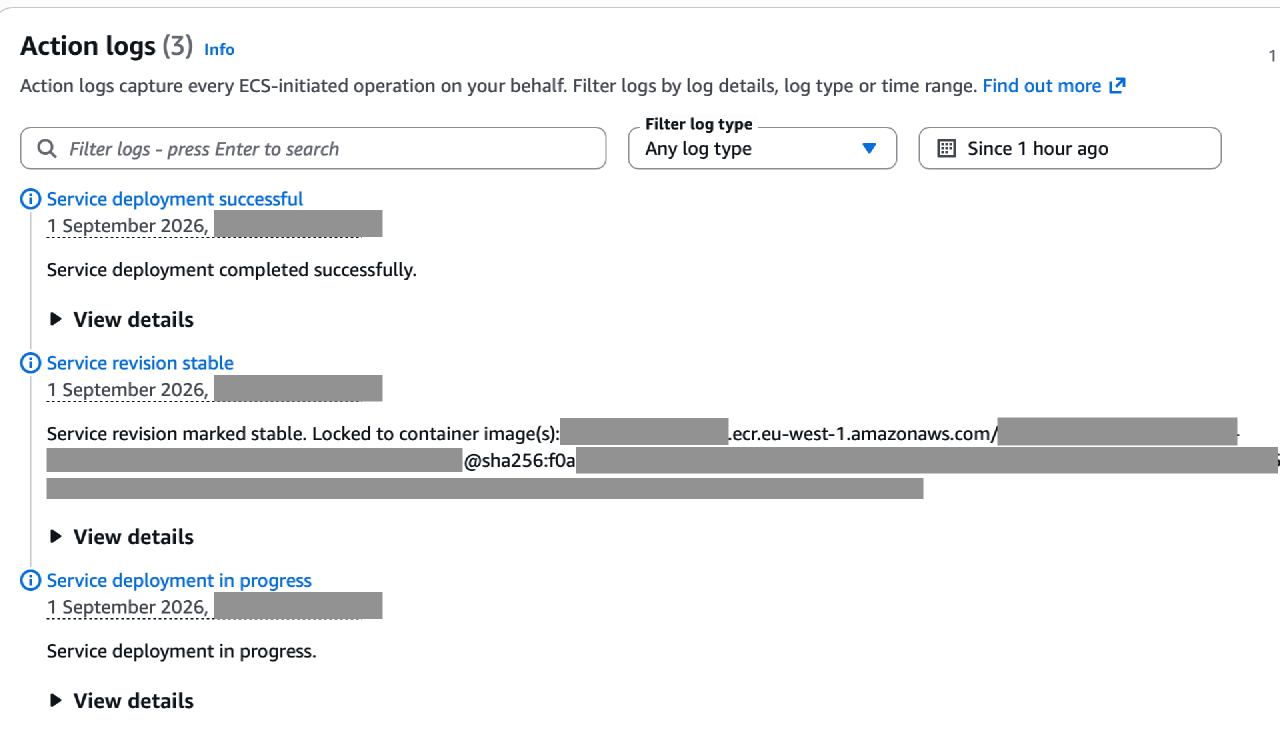
AWS announced Action Logs on 21 July 2026, and they’re available in all AWS regions, including the GovCloud (US) regions. If you’ve read our ECS deployment series, you’ll know why we’re glad this exists: most of the deployment failures we measured there were invisible exactly because nothing recorded the steps between those start and end states.
How enabling Action Logs works
Action Logs aren’t a setting on the cluster itself, although you can enable them in the console on the cluster settings page. They use the CloudWatch Logs vended log delivery mechanism, so the opt-in consists of three CloudWatch Logs resources, not an ECS one:
- a delivery source, which points at the cluster ARN with the log type
ACTION_LOGS(notEcsActionLogs, despite what the documentation says), - a delivery destination, which points at the log group (or an S3 bucket, or a Firehose stream),
- a delivery, which links the source to the destination.
The getting started guide
walks through those three calls with the CLI. The console does the same behind a single “Add” button,
creating a log group named /aws/vendedlogs/ecs/action-logs/<cluster-name> with 7-day retention. And
that’s where the documentation stops. There is no CloudFormation example.
The CLI example in the getting started guide uses --log-type EcsActionLogs. That value isn’t valid.
If you try to run it, you’ll get:
aws: [ERROR]: An error occurred (ValidationException) when calling the PutDeliverySource operation: Provided LogType is not valid. Supported options are [ACTION_LOGS].The correct CLI command looks like this:
aws logs put-delivery-source \
    --name my-ecs-action-logs \
    --resource-arn arn:aws:ecs:region:account-id:cluster/cluster-name \
    --log-type ACTION_LOGS
However, all three pieces have CloudFormation resource types:
AWS::Logs::DeliverySource,
AWS::Logs::DeliveryDestination
and AWS::Logs::Delivery.
Add the log group and the whole opt-in fits in one small stack.
The CloudFormation template
The template below enables Action Logs on an existing cluster and delivers them to a CloudWatch Logs
log group (it assumes Cluster is a parameter containing the cluster’s name, and KmsKey refers to
the KMS key you encrypt logs with):
 1  ActionLogsLogGroup:
 2    Type: AWS::Logs::LogGroup
 3    DeletionPolicy: Delete
 4    UpdateReplacePolicy: Delete
 5    Properties:
 6      LogGroupName: !Sub "/aws/vendedlogs/ecs/action-logs/${Cluster}"
 7      RetentionInDays: 365 # <- adjust as per your log retention policy
 8      KmsKeyId: !Ref KmsKey # <- optional if you use KMS encryption for logs (you should)
 9      ResourcePolicyDocument:
10        Version: "2012-10-17"
11        Statement:
12          - Sid: VendedLogDeliveryToCloudWatchLogs
13            Effect: Allow
14            Principal:
15              Service: delivery.logs.amazonaws.com
16            Action:
17              - logs:CreateLogStream
18              - logs:PutLogEvents
19            Resource: !Sub "arn:aws:logs:${AWS::Region}:${AWS::AccountId}:log-group:/aws/vendedlogs/ecs/action-logs/${Cluster}:log-stream:*"
20
21  ActionLogsDeliverySource:
22    Type: AWS::Logs::DeliverySource
23    Properties:
24      Name: !Sub "actlogs-${Cluster}" # must be below 60 characters
25      LogType: ACTION_LOGS
26      ResourceArn: !Sub "arn:aws:ecs:${AWS::Region}:${AWS::AccountId}:cluster/${Cluster}"
27
28  ActionLogsDeliveryDestination:
29    Type: AWS::Logs::DeliveryDestination
30    DependsOn: ActionLogsLogGroup # explicit, because GetAtt on log group would carry the :* suffix
31    Properties:
32      Name: !Sub "actlogs-${Cluster}"
33      OutputFormat: json
34      DestinationResourceArn: !Sub "arn:aws:logs:${AWS::Region}:${AWS::AccountId}:log-group:/aws/vendedlogs/ecs/action-logs/${Cluster}"
35
36  ActionLogsDelivery:
37    Type: AWS::Logs::Delivery
38    Properties:
39      DeliverySourceName: !Ref ActionLogsDeliverySource
40      DeliveryDestinationArn: !GetAtt ActionLogsDeliveryDestination.Arn
41      RecordFields:
42        - resourceArn
43        - actionSourceId
44        - logLevel
45        - eventTimestamp
46        - detail
47        - timestamp
Two things to know before you deploy:
- Action Logs are a paid feature under standard CloudWatch vended logs pricing: you pay for ingestion and storage of whatever your clusters generate, so set a log group retention that matches how long you actually look back.
- The opt-in is per cluster, so these resources need to exist once for every cluster you want covered.
Setting up monitoring like this is part of our DevOps and infrastructure work.


